




You tap a profile expecting that familiar list of shared friends. It’s gone. You update the app, restart your phone, check on desktop. Still gone.
You’re not losing it. Instagram removed the dedicated mutual followers list back in 2021, and most people only noticed years later when they went looking for it.
Here’s what we’ll cover:
- What replaced the old mutual followers feature
- Method 1: reading the native “Followed by” label properly
- Method 2: exporting and cross-referencing following lists
- Method 3: automating the whole thing with a tracking tool
- Whether mutuals show on private accounts, and if anyone gets notified
Recently-Followed picks up where Instagram quit. You can check any public account’s following list and spot shared connections in seconds. No login, no app download, completely anonymous.
What Instagram Replaced It With in 2026
The old feature was straightforward. You’d land on a profile, tap “Followers,” and Instagram would surface every account you both had in common. Clean list. Full count.
That’s dead. What you get today is a compressed label sitting under the bio.
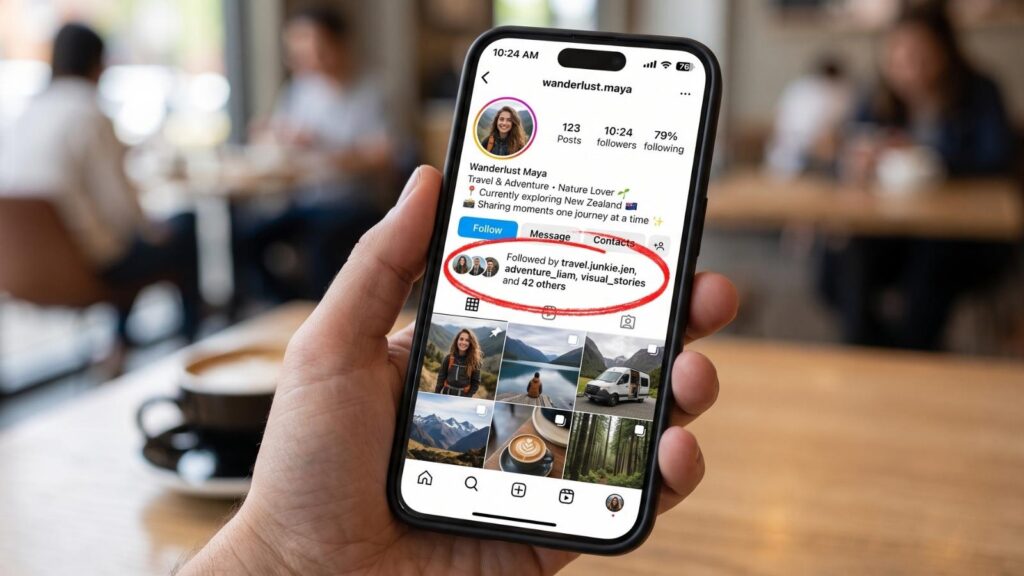
“Followed by amanda.j, marcus_lee + 12 others”
That’s it. Two names, a number, and a tap that opens a partial list.
What changed and why it matters:
| Old feature (pre-2021) | Current label (2026) |
|---|---|
| Dedicated mutual followers tab | One line under the bio |
| Full, scrollable list | Two names shown, rest collapsed |
| Worked on any account you could view | Only shows on accounts you follow or that follow you |
| Reliable count | Count often lags or caps out |
| Easy to compare two profiles | Impossible to compare directly |
Instagram never announced the removal. It just quietly disappeared during a redesign, and the “Followed by” label absorbed the job with a fraction of the depth.
Pro tip: the label sorts those two visible names by your relationship strength with them, not by who’s most relevant to the profile you’re viewing. So the friend Instagram shows you first is the one you interact with most, which may tell you nothing about the account you’re actually researching.
Why it might be missing entirely
Sometimes the label vanishes even when mutuals exist. The usual suspects:
- You don’t follow them. Instagram shows the label mainly on accounts inside your network. Strangers often show nothing.
- The account is private. Non-followers see zero follower data on private profiles.
- A blocked account sits in the overlap. Blocked accounts get scrubbed from mutual displays entirely.
- Someone deactivated or deleted their profile. Deleted accounts drop out of the count without warning.
- App glitch. Instagram tests features constantly, and follower displays break often. Updating the app fixes it more often than you’d expect.
- Cached data. Some people report mutuals not showing for days, then reappearing on their own.
Before assuming a conspiracy, update the app and clear the cache. That solves it maybe 40% of the time.
Method 1: Use the “Followed by” Label Natively
Free, instant, and limited. Start here anyway.
Step 1: Open the profile
Search the username and tap through to their page. Skip the profile picture if a story ring is around it, since that registers as a story view.
Step 2: Find the label under the bio
Look directly beneath their bio text and above their grid. You’ll see profile pictures of mutual accounts, followed by the names.
Step 3: Tap the label
This opens a list. On a good day, you’ll see every mutual. On most days, you’ll see a truncated set with no clear cutoff.
Step 4: Cross-check against their full follower list
Tap “Followers” and scroll. Instagram tends to float accounts you know toward the top of that list, so the first 20-30 entries often surface mutuals the label missed.
What this method gets you: a rough picture, fast.
What it can’t do:
- Show mutuals on accounts you don’t follow
- Give you an exact count
- Track changes over time
- Compare two accounts against each other
Nobody gets notified. Instagram does not tell users when you check their followers, mutuals, or anything else on their profile. Browsing is invisible.
Method 2: Cross-Reference Following Lists Manually
The brute-force approach. Slow, free, and accurate if you have the patience.
The core idea: pull both following lists, dump them into a spreadsheet, and find the overlap.
Step 1: Request your own Instagram data
Go to Settings, then Accounts Center, then Your information and permissions, then Download your information. Instagram emails you a file containing your full followers and following lists.
Delivery takes anywhere from a few minutes to 48 hours.
Step 2: Capture the other account’s list
You can’t download someone else’s data, so this is manual. Open their following list and screenshot as you scroll, or copy usernames into a note.
For an account following 200 people, this takes about ten minutes. For one following 2,000, you’ll be there a while. Our guide on exporting Instagram followers covers faster ways to pull a clean list.
Step 3: Paste both into a spreadsheet
Column A: your following list. Column B: theirs.
Step 4: Run a comparison formula
In Google Sheets or Excel, drop this into column C:
=IF(COUNTIF(B:B, A2)>0, “MUTUAL”, “”)
Drag it down. Every row marked MUTUAL is a shared connection.
Step 5: Sort and read
Filter column C for “MUTUAL” and you have your list. Exact, complete, no truncation.
Honest assessment of this method:
| Pros | Cons |
|---|---|
| 100% accurate | Slow as molasses |
| Free | Breaks on large accounts |
| Gives an exact count | Snapshot only, no tracking |
| Works on any public account | Manual scrolling risks accidental follows |
| No tools needed | Data goes stale within days |
Worth doing once. Painful to repeat weekly.
The order Instagram displays a following list in is not random, and it’s not alphabetical either. We broke down how Instagram sorts the following list in detail, and reading that order correctly saves you half the scrolling.
Method 3: Use a Follower Tracking Tool
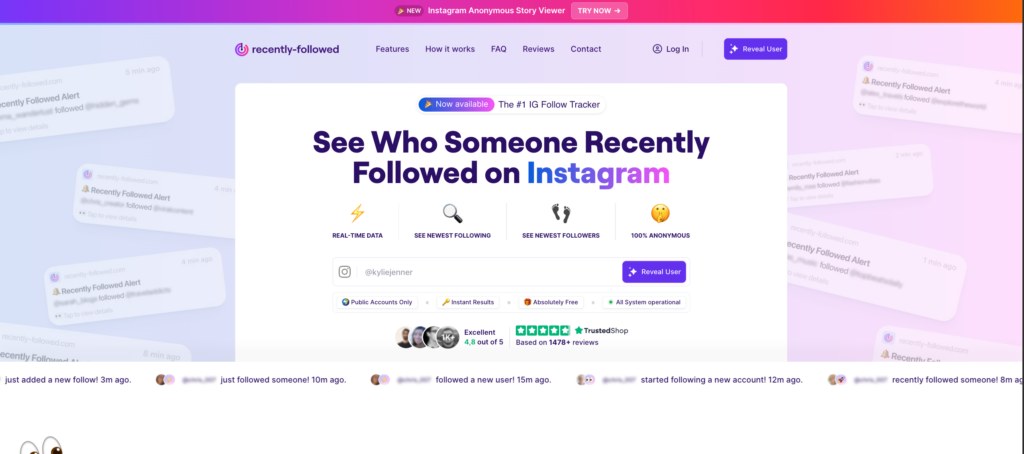
Method 2 gives you a photograph. This gives you a video.
The problem with manual comparison isn’t accuracy. It’s that mutual connections shift constantly. Someone follows a new account today, unfollows two tomorrow, and your spreadsheet is fiction by Friday.
A tracking tool watches the following list continuously and flags what changed.
What a good tool surfaces:
- Who someone recently followed, in chronological order
- New accounts entering your shared circle
- Connections that disappeared, which often means an unfollow or a block
- Overlap between multiple accounts at once
Recently-Followed does this without asking for your Instagram password. You enter a public username and see their recent follows immediately. Run it on two accounts, compare the results, and the mutual overlap is right there.
Why it beats the spreadsheet:
Watching movement tells you more than counting a static list. A mutual who appeared last week is a new connection worth noticing. A mutual who vanished is a story.
Manual comparison can’t see any of that. It only knows today.
Where tools hit a wall: private accounts. No legitimate tool bypasses Instagram’s privacy settings, and any service claiming otherwise is running a scam. If the account is private, none of this works, and that’s by design.
Recently-Followed also handles the adjacent question people usually ask next: who unfollowed me on Instagram. Mutual connections and unfollows are two sides of the same data.
Why Mutual Connections Actually Matter
Most people hunt for Instagram mutuals out of pure curiosity. That’s fine. But understanding mutual connections has real weight once you look past the gossip layer.
Mutuals are a trust signal. When a stranger’s profile shows six people you know, your brain reads that account differently. So does everyone else’s. A mutual friend in common is the closest thing Instagram has to a personal introduction.
They map your social graph. Two accounts with 40 shared connections are almost certainly inside the same community, whether that’s a workplace, a college, a scene, or a city. Zero mutuals between two people who claim to be close? That’s a signal too.
What mutuals reveal about the dynamics
Instagram interactions leave a trail, and mutual connections are the clearest part of it.
- New mutuals appearing together usually means someone joined a group, moved cities, or started a job. People rarely add one connection from a new circle. They add several.
- Mutuals disappearing at once points to a fallout, a block, or a deliberate cleanup. Nobody quietly trims six shared friends by accident.
- A single mutual, no other overlap often means a chance meeting rather than a relationship.
- High mutual count, zero Instagram activity between them is the quiet one. They’re in the same room. They just don’t talk.
Read the pattern, not the number. A count of 30 tells you nothing. Thirty mutuals that all appeared in the same week tells you plenty.
The importance of tracking mutual changes over time
Here’s the part most people miss: a mutual list is a snapshot, and snapshots lie.
You check today, see 12 mutuals, and file that away as fact. Two weeks later, the real number is 9, three of the old ones are gone, and two new ones appeared. The count barely moved. Everything underneath it did.
Only tracking mutual connections over time surfaces that. Static checking never will.
Pro tip: log the mutual list once a week for a month. The names that change are the story. The names that stay are just background.
Where third party tools fit in
Instagram gives you no way to compare two accounts, and no way to watch overlap shift over time. That’s the gap third party tools fill.
Recently-Followed handles the tracking side. Enter any public username, see who they recently followed, and run the same check on a second account. Where the lists intersect, you’ve found your mutuals. Where the lists change, you’ve found the interesting part.
The person you’re researching sees nothing. No notification, no trace, no login on your end.
A word of warning, though: the market for these tools is a swamp. Half of them harvest passwords, and a loud minority promise access to private accounts they cannot possibly reach. People rightly hate the whole category because of it.
The filter is simple:
| Green flag | Red flag |
|---|---|
| Works without your login | Demands your Instagram password |
| Public accounts only | Promises private account access |
| Free or clearly priced | Vague subscription traps |
| No app install needed | Requires downloading an APK |
If a tool asks for your password, close the tab. There is no legitimate reason to need it.
Explore the content, not just the count
One last thought before you continue down the rabbit hole.
Mutual connections tell you who overlaps. They don’t tell you why. For that, look at what those shared accounts actually post, which posts get engagement from both parties, and which content keeps showing up across both feeds.
The ability to see mutuals is a starting point. What you do with it is where the real answers live.
FAQs
Can I see mutual followers on a private account?
No. Instagram hides all follower data on private accounts from anyone outside their approved followers, mutuals included. You’ll see the bio, profile picture, and follower counts. Nothing else. No app, tool, or trick changes this.
Do they get notified when I check mutual followers?
No. Instagram sends no notification when you view a profile, browse a follower list, or check mutual connections. Profile browsing is entirely silent.
Is there an app that shows mutual followers?
Tools like Recently-Followed let you pull public following lists and spot overlap. Anything demanding your Instagram login is unsafe, and any app claiming to show mutuals on private accounts is lying.
Why do mutual followers show for some profiles but not others?
Instagram displays the “Followed by” label mainly on accounts within your network. On strangers, private profiles, and accounts with blocked users in the overlap, the label often disappears completely.
Did Instagram bring the mutual followers list back?
Not as a dedicated tab. The “Followed by” label is the only native replacement, and Instagram tests changes to follower displays frequently, so what you see today may look different next month.
How many mutuals mean two people actually know each other?
There’s no magic number. A high mutual count usually points to shared communities rather than a personal relationship. Two people in the same city with the same interests can rack up 50 mutuals and have never met.
Find Your Mutual Connections with Recently-Followed
Instagram took the mutual followers list away and gave back a two-name label. That’s the whole story. The data still exists, it’s still public, and it’s still findable. You just have to work a little harder to reach it.
Key takeaways:
- The dedicated mutual followers list was removed around 2021 and hasn’t returned
- The “Followed by” label is the native replacement, and it’s limited
- Missing mutuals often come from blocks, deleted accounts, or a cache glitch
- Manual spreadsheet comparison is accurate but slow and goes stale fast
- Tracking tools show movement over time, which a static list never can
- Private accounts reveal nothing to non-followers, and no tool changes that
- Nobody gets notified when you check
Recently-Followed shows you who any public account recently followed, updated around the clock. Run it on two profiles, and the overlap tells its own story. Free, anonymous, no login required.

.webp)