



Instagram will never send you a notification when someone unfollows you. No alert, no email, nothing. One day, your follower count just quietly drops, and you’re left guessing who left and why.
The good news? You don’t need a sketchy app or your login credentials to find out. Here’s what this article covers:
- How to check manually with zero tools
- A quick maths trick using your follower count
- The fastest way to see exactly who unfollowed you
- Why people unfollow, and what to actually do about it
Prefer to skip straight to the answer? Recently-Followed tracks follower changes on any public account, anonymously and in real time, no app download required.
Method 1: Check Manually (No App)
This is the most straightforward way to find Instagram unfollowers, and it costs you nothing. No third-party app. No password. Just a bit of patience.
There are two ways to do it manually inside the Instagram app:
Option A: Search their profile directly
- Open Instagram and go to your profile
- Tap Followers to open your followers list
- Use the search bar to look up a specific person you suspect unfollowed you
- If their name doesn’t appear in your followers list, they’ve unfollowed you
This works well for small accounts or when you’re checking on a specific person. For large accounts with thousands of followers, it gets tedious fast.
Option B: Download your Instagram data
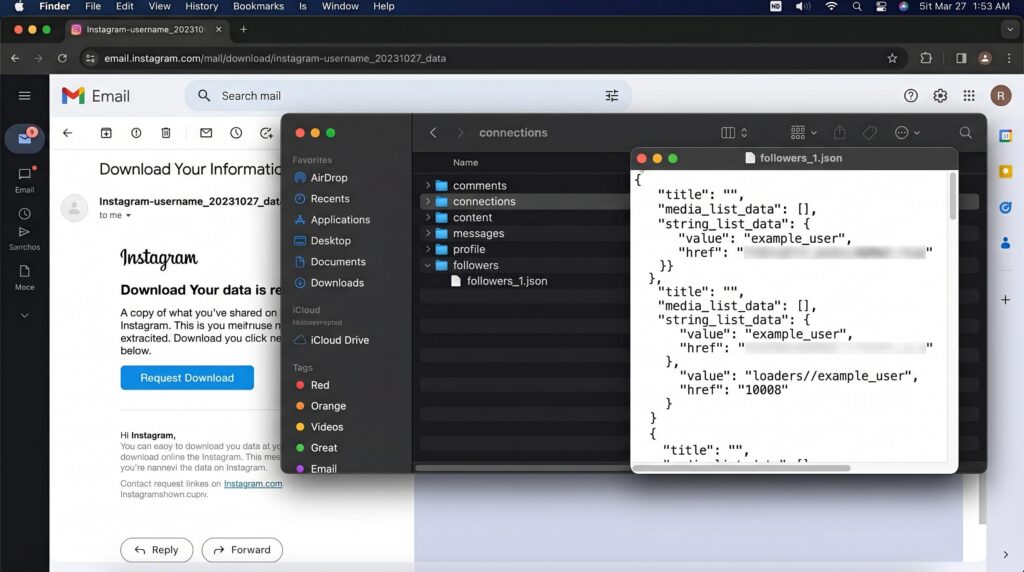
This is the cleanest no-app method, and it’s 100% safe because you never share data or hand over your Instagram password to anyone.
- Open Instagram and go to Settings
- Tap Account Centre, then Your Information and Permissions
- Select Download Your Information and request a copy
- Instagram will email you a zip file, usually within a few hours
Once you download the zip file and open it, navigate to the followers_and_following folder. Inside, you’ll find two files: your followers list and your following list. Compare them side by side in Excel or Google Sheets to spot anyone you follow who isn’t following you back. These are your recent unfollowers hiding in plain sight.
Pro tip: Do this at the start of every week and keep a running log. Over time, you’ll spot patterns in when people unfollow, which is often more useful than knowing who.
Method 2: Use Your Follower Count
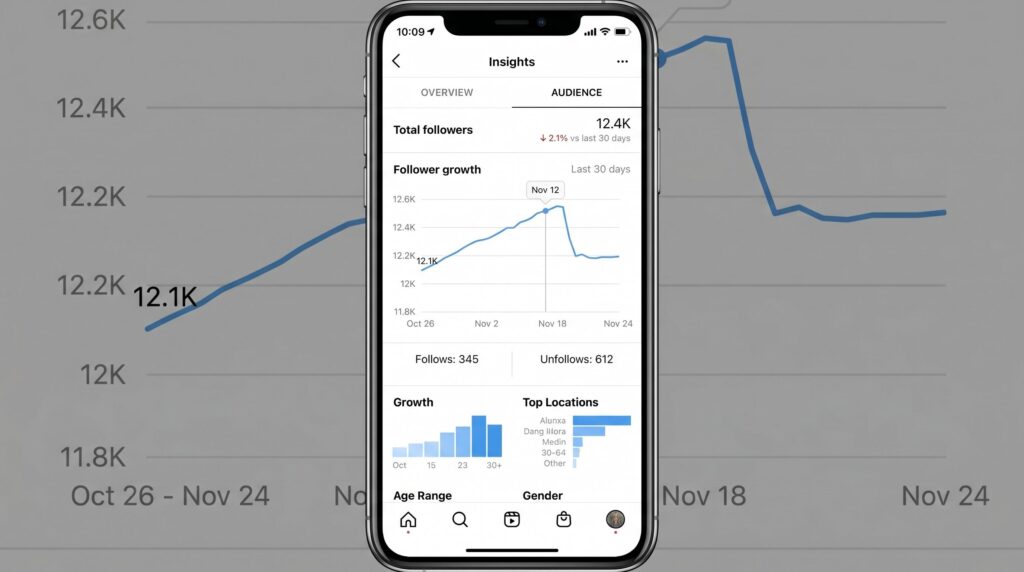
No tools, no downloads. This method takes about ten seconds.
Open the Instagram app and go to your profile. You’ll see two numbers staring back at you: Followers and Following. Write them down or screenshot them. Check again in a few days. If your follower count dropped but you didn’t hit the unfollow button on anyone, someone unfollowed you.
It’s simple maths. If you had 1,240 followers on Monday and you have 1,233 on Friday, seven people left.
This method won’t tell you who unfollowed you on Instagram, but it tells you how many people did and roughly when. That context matters. If your follower count dropped sharply right after a specific post, that’s direct feedback about your content.
| What the numbers tell you | What to do |
|---|---|
| Gradual, steady drops | Normal follower churn, review content strategy |
| Sudden large drop after a post | That post missed your audience |
| Drops with no new follows | Follower growth has stalled completely |
| Count stays flat despite new follows | Ghost followers or bot purges offsetting growth |
For creator account users, Instagram Insights gives you a more detailed view. Head to Insights, then Total Followers, and you’ll see a graph of follower growth and decline over time. Instagram won’t name names here either, but the trend lines are genuinely useful for spotting patterns week by week.
Method 3: Use a Follower Tracker
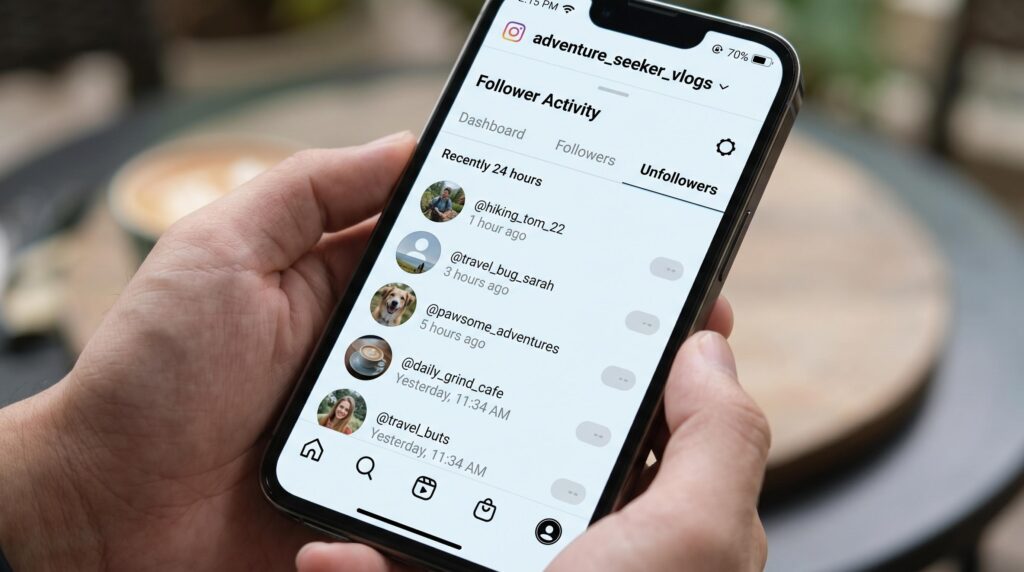
The manual methods above work, but they have a real limit: they can’t tell you exactly who unfollowed you or when it happened. For that, you need a tool built specifically to track Instagram unfollowers.
Most apps in this space ask you to login with your Instagram password, which is a serious security risk. Instagram’s API explicitly restricts this kind of access, and accounts that connect to shady third-party apps risk being flagged or suspended. Most apps that promise instant results and ask for your login credentials aren’t worth the risk.
Recently-Followed takes a different approach entirely. You don’t need to login, share data, or hand over any credentials. Just enter a public username and get a real-time view of follower activity, completely anonymously. It’s the best way to track Instagram unfollowers without putting your account on the line.
Here’s how it compares to going manually:
| Manual Method | Recently-Followed | |
|---|---|---|
| Login required | No | No |
| Instagram password needed | No | No |
| Shows exact unfollowers | No | Yes |
| Real-time updates | No | Yes |
| Works on any public account | Partial | Yes |
| Time required | 20-30 mins | A few clicks |
If you want to track Instagram followers consistently over time without the weekly manual grind, this is the tool that makes it effortless. You can also check out the Instagram followers tracker page for a deeper look at how ongoing follower monitoring works.
Why People Unfollow (And What To Do)
People curate their Instagram feed constantly. They unfollow accounts when the content no longer fits what they’re looking for, when they’re doing a digital detox, or simply because they forget why they followed in the first place. Understanding the real reasons helps you respond with better content rather than anxiety.
The most common reasons people hit the unfollow button:
- Posting too much or too little. Both extremes lose followers. Too many posts flood the feed; too few make people forget you exist
- Niche drift. If your account used to be about one thing and slowly became something else, your original audience will leave
- Too promotional. Constant product pushes with no genuine value make your account feel like a billboard
- Follow-unfollow tactics. Some accounts follow you to get a follow back, then unfollow a week later. These aren’t real followers, so don’t lose sleep over them
- Bot and ghost follower purges. Instagram regularly removes fake accounts and inactive users. A sudden drop in follower count is often Instagram cleaning house, not real people leaving
- Content format mismatch. If your audience came for videos and you’ve switched to static posts, expect some churn
What to actually do about it:
The most useful thing you can do with unfollow data is treat it as feedback, not rejection. If you notice a pattern, for example, consistent drops after a certain type of post, that’s a signal to adjust. Compare your why people unfollow on Instagram patterns against your content calendar, and you’ll start to see the connection clearly.
A few practical fixes:
- Post consistently, not constantly. Aim for quality over volume
- Engage with your current followers before chasing new ones. Comment back, reply to stories, interact genuinely
- Watch your follower count weekly, not daily. Daily fluctuations create noise; weekly trends tell the real story
- Use your Instagram data download as a monthly audit rather than a one-time check
Losing followers is normal. Even accounts with 90,000+ followers report losing 30 to 500 followers every single week. What matters is whether your new followers outpace the ones leaving and whether the followers you keep actually engage.
For a closer look at how follower behaviour shifts after someone hits follow or unfollow, this breakdown of Instagram’s new followers behaviour is worth a read.
What Actually Happens When You Unfollow Someone
This answers the questions people are really typing late at night. The privacy side of unfollowing matters just as much as knowing how to find unfollowers.
Does Instagram send unfollow notifications?
No. Unfollow notifications don’t exist on Instagram. The action is completely silent, whether you’re unfollowing a personal account, a creator account, or a brand page. So if you’ve been hesitant to clean up your following list, you don’t need to hope for the best. Just do it.
Can they still figure it out?
Yes, but only with effort. Here’s how someone could discover you unfollowed them without Instagram alerting them directly:
- Follower count drop: Anyone watching their follower count will notice a dip, but won’t know it’s specifically you
- Manual followers list check: If they search your username in their followers list and you’re gone, that confirms it
- The Follow button: Your profile showing “Follow” instead of “Following” gives it away instantly
- Third-party app tracking: A third-party app built to see who recently unfollowed users will flag you immediately
Most people won’t check. But if someone monitors their Instagram data closely, there’s a chance they’ll spot it.
What changes after an unfollow?
Forget the assumption that unfollowing cuts all access. Here’s the reality:
| What changes | What stays the same |
|---|---|
| Their posts leave your feed | Their access to your public posts |
| Their stories disappear from your view | Old comments and likes on both sides |
| Your name leaves their followers list | Their ability to comment or message |
| Their follower count drops by one | Their full visibility of your public account |
If your account is public, the person you unfollowed can still visit your profile, scroll through your posts, and interact freely. They’re simply no longer connected through a mutual follow.
Want to unfollow quietly? Use Mute.
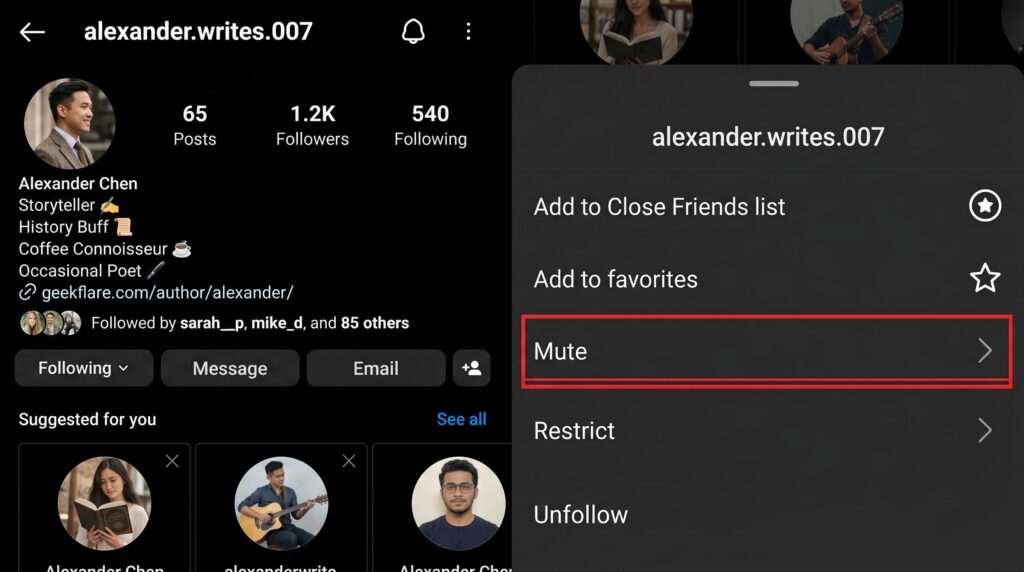
If you’d rather keep the connection but stop seeing someone’s content, Instagram’s Mute feature is the clean fix. No drop in their follower count, no awkward conversation. It works for small accounts where every unfollow is noticeable, and for large accounts where you’re just managing feed noise.
To mute someone:
- Open their profile in the Instagram app
- Tap Following, then Mute
- Select posts, stories, or both
Can they see if you visited their profile?
No. Profile visits leave zero trace, even if you’re scrolling someone’s posts or checking their current followers on Instagram manually. This is exactly what makes Recently-Followed so useful. You can track Instagram unfollowers on any public account, compare follower activity week over week, and access detailed reports, all without sharing your Instagram password, without login, and without anyone knowing you looked.
For more on anonymous tracking, the guide on checking Instagram stories anonymously is worth a read.
What about ghost followers?
Not every follower count drop means a specific person hit the unfollow button on you. Instagram regularly purges ghost followers, bots, and inactive accounts automatically. When that happens, your count drops with no one making a conscious decision to leave.
If you notice a sudden follower drop, it might be Instagram cleaning house rather than real people unfollowing, and that’s actually good for your account since real engagement from real followers is what drives genuine follower growth.
To tell the difference, download your Instagram data as a zip file, open the followers file inside the file structure, and compare it to last week’s snapshot in Google Sheets. Over time, you’ll start to spot patterns between real unfollows and automated account removals.
Most apps can’t make that distinction. Doing it manually with your own data is the most reliable method, and tools like Recently-Followed give you a clean website dashboard to cross-reference recent unfollowers without ever touching your Instagram password.
Finally Know Who Unfollowed You With Recently-Followed
Instagram will never do this work for you. No notifications, no names, no timestamps. But now you have three solid methods to find out exactly who unfollowed you on Instagram and why your follower count keeps shifting.
Key takeaways:
- Instagram never sends unfollow notifications, by design
- The manual zip file method is the safest no-app option
- Your follower count is the quickest early warning signal
- Ghost followers and bot purges cause drops, too, not just real unfollows
- Mute is the quiet alternative to unfollowing someone
- Profile visits leave zero trace on any Instagram account
Done with the guesswork? Recently-Followed shows you exactly who recently unfollowed any public Instagram account in real time, no login, no Instagram password, and no third-party app eating up storage on your phone. It’s the fastest way to get answers the Instagram app will never give you.
Questions About Being Unfollowed on Instagram Answered
Does Instagram notify you when someone unfollows you?
No. Instagram never sends unfollow notifications to anyone. Your Instagram followers won’t know you unfollowed them unless they manually check their followers list themselves.
Can they see if you checked their profile?
No. Instagram keeps profile visits completely private. You can check anyone’s account, see who unfollowed, or review their followers list without leaving any trace.
How to see who unfollowed you on Instagram without any app?
Download your Instagram data as a zip file, then compare your followers list in Google Sheets week over week to see who unfollowed you between snapshots.
How to hide who you follow on Instagram in 2026?
Switch to a private account. This limits your following list visibility to approved followers only, so friends and your target audience are the only ones with access.
Can ChatGPT see who unfollowed me on Instagram?
No. ChatGPT has no link to Instagram’s data or API. To see who unfollowed you, use your data export or a dedicated follow cop tool like Recently-Followed.

.webp)