



You want to know who just started following an account. Simple question. Except Instagram scrambles the follower list so badly that the person who followed yesterday sits buried between accounts from 2020 and 2022.
There’s no “new followers” button. There’s no chronological view. The app that knows the exact second every follow happened refuses to show it to you.
Here’s what we’ll cover:
- Why Instagram stopped showing new followers in order
- What you can still see natively, and what’s locked away
- The manual method, and where it falls apart
- How a new follower tracker rebuilds the timeline
- Who actually uses this, from partners to competitors
Recently-Followed skips the scramble entirely. Enter any public username and see recent follow activity in true chronological order. To understand the behavior behind those follows first, our guide on how new followers behave sets the stage.
Why Instagram Doesn’t Show New Followers in Order
It used to be effortless. Two changes killed it.
The Following Activity tab died in October 2019.
Instagram once had a feed showing what accounts you follow were doing, including who they followed and when. That tab was removed entirely in October 2019, and with it went the last easy window into follow activity.
Chronological sorting vanished around 2021.
Before that, follower and following lists defaulted to newest-first. The top name was the most recent. Instagram quietly scrapped that default, replacing it with an algorithm.
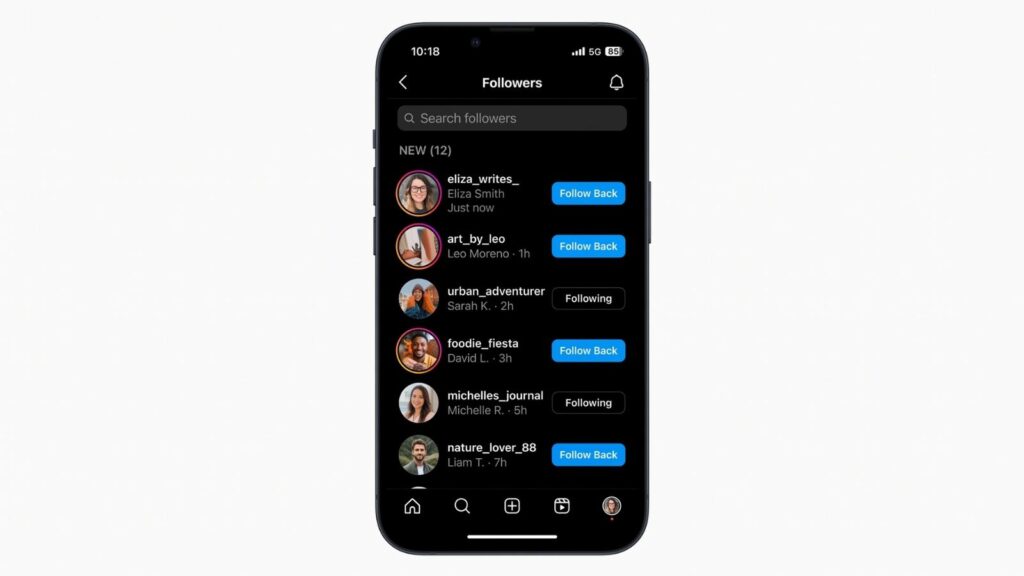
Now the follower list is sorted by relevance, weighing mutual connections, interaction signals, and engagement history. The accounts at the top are the ones Instagram thinks matter to you, the viewer, not the ones that followed most recently.
The killer detail: the sort is personalized to whoever’s looking. Two people viewing the same account’s follower list see two different orders. Position tells you nothing reliable about timing, because timing was never the sorting rule. We break down the full logic in how Instagram’s following list is sorted.
One exception worth knowing: on small accounts, roughly under 300, Instagram has less interaction data to sort by, so new followers drift closer to the top. On large accounts, the algorithm takes over completely and recent follows scatter everywhere.
What You Can Still See Natively
Instagram didn’t remove everything. Here’s the honest inventory of what the native app still gives you.
On your own account
You have the most access to your own data:
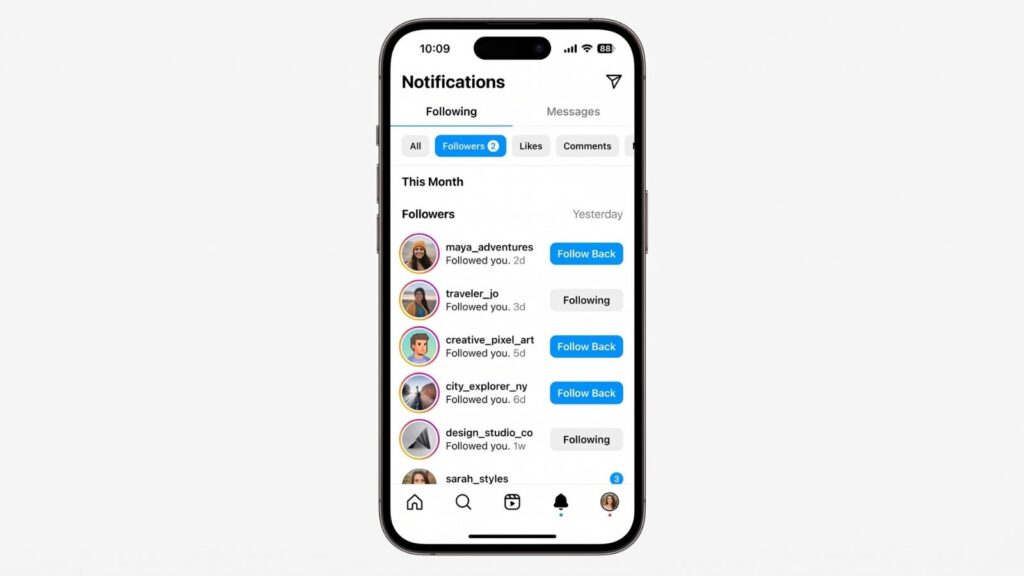
- The Activity Feed. Tap the heart icon, and you’ll see follow notifications, roughly in order, telling you who recently followed you.
- The “Followed you” review. Under Settings and Your Activity, Instagram surfaces accounts that recently followed you, closer to chronological order, covering roughly the last several months.
These only work for your account. The moment you want someone else’s new followers, this door closes.
On someone else’s public account
| What you can see | What’s hidden |
|---|---|
| Full follower list (unordered) | Follow timestamps |
| Full following list (unordered) | Chronological order |
| Follower and following counts | Who’s genuinely new |
| Who follows whom | Any native “new follower” view |
You can open any public account’s follower list and scroll it. What you can’t do is tell which names are new, because the order is algorithmic and no dates appear anywhere.
On private accounts
Nothing. Private accounts hide all follower and following data from anyone who isn’t an approved follower. You’ll see the bio, profile picture, and counts, and that’s the entire list. No tool, trick, or paid service changes this, and any claiming to access private accounts is a scam built to harvest your password.
How to Spot New Followers Manually
Free, native, and tedious. Here’s the real method, limitations and all.
The screenshot-and-compare approach
- Open the public profile and tap the followers tab
- Screenshot the full list, scrolling as you go
- Save the screenshots dated today
- Wait a week and repeat
- Compare the two sets by eye, hunting for names that weren’t there before
That’s genuinely the whole method. New names in the second set are new followers. It works, in the narrow sense that it produces an answer.
Where it breaks
On small accounts, it limps along. Under a few hundred followers, new names cluster near the top and comparison is manageable.
On large accounts, it collapses. Screenshotting 5,000 followers by hand, then eyeballing two sets for differences, is a recipe for missed names and wasted afternoons. Comparing follower lists manually is time-consuming and prone to error, and one missed name breaks the whole comparison.
| The manual method | Reality |
|---|---|
| Cost | Free |
| Login needed | None, on public accounts |
| Accuracy on small accounts | Workable |
| Accuracy on large accounts | Poor |
| Time required | High |
| Catches the exact follow date | Never |
| Scales to multiple accounts | Not a chance |
For one small account checked occasionally, manual works. For anything real, or anything large, it’s the wrong tool.
Pro tip: if you insist on doing this by hand, screenshot at consistent intervals, same day each week. Irregular checks make comparison harder and let follows slip through the gaps between them.
How a New Follower Tracker Works
This is the manual method, automated and made accurate.
A new follower tracker reads a public account’s follow activity, sorts it by recency, and flags what’s changed since your last check. The screenshot grind, done for you in seconds.
How Recently-Followed does it
Step 1: Enter the public username. Go to Recently-Followed, type the Instagram username, no @ symbol. No login, no Instagram password, no account connection.
Step 2: Pull the public data. Within seconds, the tool reads the account’s public follow activity and re-sorts it into true chronological order, newest first.
Step 3: Read the recent activity. The top of the list shows the most recent follows. This alone answers “who did they follow lately” in a single glance, the view Instagram refuses to give you.
Step 4: Re-check to catch new activity. Come back later and run it again. Anything added since your last check surfaces at the top, so you catch new follows as they happen rather than guessing.
Why no-login is the only safe model
The single most important thing to check in any tracker: does it want your Instagram password?
If yes, walk away. Over 60% of follower tracking apps request unnecessary permissions, and login-based apps carry serious security risks, from account restriction to outright theft. No legitimate tool needs your credentials to read public data.
Recently-Followed never asks for a login because it reads only publicly available data, the same information any logged-out browser can see, just organized properly. That’s the foundation of anonymous follower tracking: no credentials handed over, no risk taken on, no trace left behind.
How the tools stack up
| Tool | Login | Sorts by time | Free tier |
|---|---|---|---|
| Recently-Followed | ❌ No | ✅ Yes | ✅ Yes |
| Recent Follow app | ❌ No | ✅ Yes | ✅ Yes |
| Snoopreport | ⚠️ Varies | ✅ Reports | ❌ Premium subscription |
| Manual screenshots | ❌ No | ❌ No | ✅ Free |
The safe tools share one trait: none demand your password. Any that do belong in a more dangerous category, no matter what they promise.
Use Cases: Who’s Following Whom
Once you can read new followers in order, the signal gets genuinely useful.
Who’s following your partner
The quiet, human one, and a common reason people search this. A partner’s new followers can trace shifts the profile grid never shows. A cluster of new accounts from one place, one friend group, or one person appearing alongside their circle tells a story. It’s personal awareness, and a tracker means you check without repeatedly opening their profile, which builds its own awkward trail.
Competitor monitoring
Businesses track competitors’ follow activity to watch their moves in public. When a rival brand’s account starts gaining a specific type of follower, or starts following micro-influencers in your niche, a strategy is forming, often weeks before any announcement. Check at regular intervals and you see it early.
Influencer research
For influencer marketing, new followers and new follows both matter. An influencer’s recent follows hint at potential partnerships and brand relationships. Their new followers reveal which audience segments are discovering them, useful for judging whether their reach fits your campaign before you spend a rupee.
Parents and safety
Some parents monitor a child’s public follow activity for safety, watching for new connections that raise concern. On a public account, this is publicly available data, and a no-login tool keeps the checking discreet.
Personal curiosity
Sometimes you’re just curious who a friend, a public figure, or an account you admire is connecting with lately. Follow activity is the cleanest window into someone’s shifting attention.
Across every use case, the discipline is identical. Check at consistent intervals, watch for pattern changes rather than single follows, and let a few weeks of data build before reading too much into anything. One follow is noise. A pattern is signal.
What New Followers Reveal About an Account
A new follower isn’t just a number ticking up. Read a batch of them together, and they expose patterns the follower count alone will never show.
When you look at someone’s recent followers on Instagram, you’re reading user behavior in real time. Who discovered them, and why? A sudden surge usually traces back to a specific trigger, and identifying that trigger is where the real insight lives.
What a wave of new followers usually means:
- A recent post went viral. If an account gains hundreds of followers in a short window, check their recent post history. Viral content pulls new followers fast, and the timing lines up almost every time.
- A shift in interests. New followers arriving from one niche signal that an account is being discovered by a new community.
- Personal connections forming. On personal accounts, a cluster of new followers who share mutual friends often marks a real-life event, a new job, a new social circle, a new relationship.
- A collaboration landed. When a creator account suddenly gains followers overlapping with another creator’s audience, they’ve likely partnered up.
The trick is reading engagement patterns alongside raw counts. An account that gains 500 followers but whose engagement stays flat probably caught a viral moment full of passive scrollers. One that gains 50 followers who all comment and interact just found 50 real fans. Quality hides inside the follower data, and the count alone won’t surface it.
This is exactly what makes tracking recent follow activity more useful than checking a follower count once. The count says how many. The recent followers say who and hint at why, and that’s the part worth watching.
Pro tip: when you spot a follower spike, cross-reference it against the account’s most recent posts. Matching the surge to a specific post tells you what content actually drives growth, whether it’s your own account or a competitor’s you’re studying.
Free Methods vs. Paid Tools for Tracking Followers
You don’t always need to pay to track someone’s recent followers. But the free route and the paid route solve different problems, and knowing which fits saves you both money and manual effort.
The free methods:
- Native app checking. Open the Instagram app, go to a public account, and scroll the following tab. Free, no login required, but the list isn’t a chronological list, so spotting the most recently followed accounts takes guesswork.
- Screenshot comparison. Save the follower list today, compare it later. A quick comparison that works on small accounts but buckles under manual effort on large ones.
- No-login trackers. Tools that access public data and re-sort it by recency, free to check a public Instagram username, no credentials handed over.
When a paid tool earns its cost:
Paid services layer on automation, alerts, and historical reporting. If you’re tracking many accounts, or need periodic reports rather than one-off checks, a subscription can be worth it. For a single account checked occasionally, it’s overkill.
| Free methods | Paid tools | |
|---|---|---|
| Cost | Free | Subscription |
| Login required | None on public data | Sometimes |
| Best for | Occasional checks | Bulk or automated tracking |
| Historical reports | ❌ | ✅ |
A serious word on privacy. Some third-party tool operators quietly sell what they collect to data brokers. A tool that respects user privacy reads only what’s public and protects user privacy by never asking for your login. That’s the line: reading a public follower list is fine, but any service demanding access to your Instagram account, or reselling your Instagram data, isn’t protecting anyone.
The safest free method is a no-login tracker that reads public follower data, sorts it newest-first, and leaves no trace. It handles the “see who someone recently started following” question without the security risks that come from handing over credentials or feeding data brokers.
Before you start tracking with any tool, run one test. Enter your own public Instagram username and check whether the recent follows it shows match what you actually did. If the tool is accurate on your account, it’s accurate on others. If it isn’t, no premium plan will fix it.
Your Questions About New Followers, Answered
How far back can I see new followers?
A tracker shows the current follow activity re-sorted by recency, so you see the most recent follows on top immediately. To track changes over time, you check at intervals, and each new check surfaces what was added since the last one. Instagram keeps no public history of an account’s follow activity, so there’s no archive to pull, tracking only works forward from when you start.
Can I see new followers on a private account?
No. Private accounts hide all follower and following data from anyone who isn’t an approved follower. You’ll see the bio, profile picture, and counts, nothing else. No legitimate tool bypasses this, and services claiming to access private accounts exist to steal your password or your money. Only public accounts can be tracked.
Will they know I checked?
No. Viewing a public follower list, manually or through a no-login tool, sends no notification and leaves no trace. Instagram doesn’t tell anyone when their followers are viewed, by a person or a tool. As long as you don’t follow, like, comment, or view their story, you stay completely anonymous. For the full picture on what does and doesn’t expose you, see whether people can see if you search them.
Does Instagram notify someone when they get a new follower?
Yes, but only the account owner gets that notification, in their own Activity Feed. Third parties see nothing. You checking an account’s new followers is entirely separate and triggers no alert to anyone.
Are new follower trackers against Instagram’s rules?
Tools reading public data without your login sit in a very different position from apps demanding credentials or scraping at industrial scale. Reading a public follower list is something any logged-out browser does. The risky category is password-harvesting apps, which can violate Instagram’s terms and endanger your account.
Can I track my own new followers this way?
Yes. For your own account, you also have native options: the Activity Feed and the “Followed you” review under Your Activity, though both are limited. A tracker adds cleaner chronological sorting and lets you spot which posts drove new-follower spikes.
Start Catching New Followers with Recently-Followed
Instagram knows exactly who followed an account and when, and shows you neither. The follower list you scroll is a relevance ranking personalized to you, not a timeline, which is why manual comparison falls apart on any account of real size. The fix isn’t more scrolling. It’s reading the public data in the order Instagram hides.
Key takeaways:
- Instagram removed the Following Activity tab in October 2019
- Chronological sorting for lists disappeared around 2021
- The follower list is sorted by algorithmic relevance, personalized to each viewer
- Small accounts still surface new followers near the top
- A no-login tracker re-sorts public data into true chronological order
- Never use any tool that asks for your Instagram password
- Tracking works forward only, so the sooner you start, the more you catch
Ready to see what Instagram won’t show you? Recently-Followed reveals who any public account recently followed in real chronological order, and every check catches what’s new. Set your baseline today, watch who someone recently followed whenever you’re curious, and let the timeline tell you what a scrambled list never could. Free, anonymous, no login, no traces. Start tracking now.

.webp)