




The short answer is no. Instagram does not notify users when someone searches for them. You can type a username into the search bar a hundred times, and that person will never know.
Now the part nobody tells you. Searching is invisible. What you do after the search is where people get caught.
Here’s what we’ll cover:
- What Instagram tracks privately versus what other users can actually see
- 5 actions that expose you the second you take them
- Whether repeated searches push you into their “Suggested for You”
- How to browse a profile and leave zero trace
- Straight answers on unliking, highlights, and finstas
Recently-Followed exists for exactly this reason. You can view Instagram stories anonymously without your username ever hitting their viewer list. No login, no account, no trace.
What Instagram Tracks vs. What Others See
Instagram logs a lot about you. Almost none of it is visible to other users.
Two separate buckets exist here, and people constantly confuse them.
Bucket 1: Private to you only
Your search history belongs to you. Instagram stores your recent searches so it can personalize your feed and explore page, but that data never leaves your account. The person you searched sees nothing. No alert, no notification, no counter.
| Activity | Does Instagram log it? | Can they see it? |
|---|---|---|
| Searching a username | Yes | ❌ No |
| Viewing their profile | Yes | ❌ No |
| Scrolling their photos and videos | Yes | ❌ No |
| Tapping their profile picture | Yes | ❌ No |
| Zooming into a picture | Yes | ❌ No |
| Reading their bio | Yes | ❌ No |
Users cannot see who viewed their Instagram profile. Instagram does not provide a counter for profile visits, has never offered one, and shows no sign of adding it.
Bucket 2: Visible to the creator
| Activity | Can they see it? | How fast |
|---|---|---|
| Viewing their story | ✅ Yes, username on viewer list | Instantly |
| Liking a post | ✅ Yes, notification | Instantly |
| Commenting | ✅ Yes, notification | Instantly |
| Following | ✅ Yes, notification | Instantly |
| Sending a DM | ✅ Yes | Instantly |
| Viewing a highlight | ⚠️ Only within first 24 hours | Instantly |
Instagram shows who viewed your Story. Your username appears on that viewer list, and creators can check it for 48 hours after posting.
Clearing your search history. Want to tidy up? Go to your profile, tap the menu in the top right corner, then Your Activity, then Recent Searches. Clear it. This changes nothing for the other person. It only cleans your own app.
5 Actions That DO Expose You
The search is safe. These five are not. We dug deeper into this in our guide on whether Instagram notifies when you search someone, and the pattern is always the same: passive is private, active is visible.
1. Viewing Their Story
The single most common slip. You land on a profile, their story ring glows, your thumb moves on autopilot. Done. Your username sits on their viewer list now.
Avoid tapping the profile picture when a story ring is active. That ring is a trapdoor.
Worse, the viewer list is sorted by engagement once it passes 50 views. Repeat viewers who interact often float to the top. You do not just appear. You appear prominently.
2. Liking a Post
Instant notification. Even a like on a photo from 2019 fires an alert.
The deep-like disaster: scrolling far back into someone’s grid and double-tapping by accident is how people out themselves. One slip on a three-year-old post, and there is no plausible deniability.
3. Commenting
Obvious, permanent, and public. Other users see it too, not just the account owner.
4. Following
A follow request or new follower notification is the loudest signal on the platform. On a private account, they see the request sitting there until they act on it.
5. Sending a DM
Even a message request lands in their inbox. Even if you unsend it, they may have seen the preview.
Pro tip: turn your phone to airplane mode before opening a story? It does not work. The view registers the moment your device reconnects. That trick died years ago.
Does Unliking Remove the Notification?
Short version: partially, and unreliably.
When you unlike a post, the notification disappears from their activity feed. What it cannot do is un-ring the bell.
If they had push notifications on, the alert already hit their lock screen. If they opened the app in that window, they already saw it. The removal only helps if nobody was looking.
Same story with unsending a DM or deleting a comment. The record vanishes. The memory does not.
Can Searching Affect “Suggested for You”?
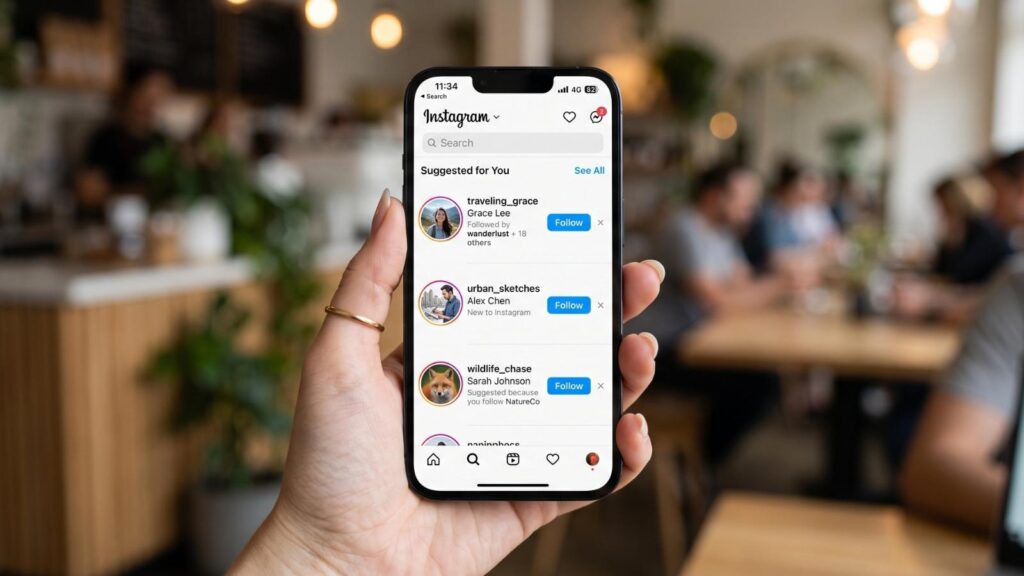
This is the question that actually worries people, and the honest answer is more nuanced than either extreme.
One search does nothing. Type a username, look at their profile, leave. You will not surface in their suggestions off the back of that.
Repeated behavior is a different matter. The Instagram algorithm builds a picture from many signals at once:
- How often do you visit a particular account
- Mutual connections between you two
- Shared contacts if you synced your phone book
- Whether you appear in the same photos or tagged posts
- Engagement patterns across other social media platforms owned by Meta
Stack enough of those, and yes, you can drift into their suggested list. The search alone is not the cause. The pattern of attention is.
What genuinely raises your odds:
- Contact syncing (the biggest one by far, and most people forget it is on)
- Mutual followers in high numbers
- Facebook account linked to the same Meta profile
- Repeatedly viewing their stories
What does not:
- Searching their name once
- Reading their bio
- Looking at their photos without interacting
If you view someone’s profile without interacting, they will not know. The suggestion system is probabilistic, not a tip-off.
How to lower your odds: unlink your contacts. Settings, Accounts Center, Your information and permissions, Upload contacts. Turn it off. This one toggle removes the strongest link between your search behavior and their suggestion feed.
How to Browse Without Leaving a Trace
Here is the practical section every thin article skips.
Rule 1: Never tap the profile picture
If a story ring surrounds it, that tap is a view. Navigate to the grid instead by tapping the username text or arriving from search results directly.
Rule 2: Scroll their grid slowly
Fast scrolling plus a stray double-tap equals a like. Slow down. Use one finger. If you plan to scroll far back, turn the phone sideways or scroll with the edge of your thumb, away from the center of the image.
Rule 3: Use the desktop site for deep browsing
The desktop site has no double-tap gesture. Accidental likes are near impossible with a mouse. For any serious profile review, open instagram.com in a browser instead of the app.
Rule 4: Understand the private account wall
A private account shows nothing to anyone outside their approved followers. No posts, no stories, no highlights. No tool, app, or trick changes this. Anyone claiming otherwise is selling you a scam.
The only thing visible on a private profile is the bio, profile picture, and follower counts.
Rule 5: View stories anonymously
Stories are the biggest exposure risk on the entire platform, and the one people slip up on most.
Instagram gives you no safe way to watch. Open it in the app, and your name lands on the list within seconds.
A dedicated anonymous Instagram story viewer solves this cleanly. You enter the username, the story loads, and your account never touches theirs. Nothing to unsee, nothing to explain.
Recently-Followed handles this without asking for your login. That distinction matters. Any tool asking for your Instagram password is either badly built or actively harvesting credentials, and we broke down the difference in our roundup of anonymous story viewer tools.
Rule 6: Ignore “profile viewer” apps entirely
Third-party apps claiming to show who viewed your profile are unreliable. Stronger than that: they are lying. Instagram’s API exposes no such data to anyone. Not to developers, not to business account holders, not to Meta partners.
These apps exist to:
- Steal your login credentials
- Install adware on your device
- Charge you for randomly generated names
Reality check: if Instagram itself cannot tell you who viewed your profile, no third-party website has a secret backdoor to it.
Rule 7: Watch their follows, not their profile
Repeatedly opening someone’s profile builds exactly the behavioral pattern you are trying to avoid. There is a quieter route.
Their following list is public data. Watching who they recently followed tells you more about what has changed in their world than another lap through their grid ever will. And you never open the app to find out.
Exposure Risk by Action
| Action | Risk | What They See | Reversible? |
|---|---|---|---|
| Searching their username | 🟢 0/5 | Nothing | N/A, nothing to reverse |
| Viewing their profile | 🟢 0/5 | Nothing | N/A |
| Scrolling their photos | 🟢 0/5 | Nothing | N/A |
| Zooming into a picture | 🟢 0/5 | Nothing | N/A |
| Viewing an old highlight (24hr+) | 🟢 0/5 | Nothing | N/A |
| Saving a post | 🟢 0/5 | Nothing, saves are private | Yes, silently |
| Screenshotting a post or story | 🟢 1/5 | Nothing on regular posts or stories | N/A |
| Screenshotting a disappearing DM | 🟡 3/5 | They get a notification | ❌ No |
| Viewing a fresh highlight (under 24hr) | 🟠 4/5 | Your username on the viewer list | ❌ No |
| Viewing their story | 🔴 5/5 | Your username on the viewer list, ranked by engagement | ❌ No |
| Liking a post | 🔴 5/5 | Instant push notification | ⚠️ Partially, unlike removes the entry only |
| Liking an old post (deep like) | 🔴 5/5 | Instant notification, plus obvious intent | ⚠️ Partially, and the damage is done |
| Commenting | 🔴 5/5 | Notification, visible to other users too | ⚠️ Delete removes it, they may have seen it |
| Following | 🔴 5/5 | Notification or a pending request on a private account | ⚠️ Unfollow removes it, the alert already fired |
| Sending a DM | 🔴 5/5 | Lands in their inbox or message requests | ⚠️ Unsend works only if unread |
| Replying to a story | 🔴 5/5 | Story view plus a DM. Double exposure | ❌ No |
| Adding them to Close Friends | 🔴 5/5 | Green ring appears on your stories for them | Yes, but they may have noticed |
How to read this: everything at 0 is passive. Everything at 4 or 5 is a tap that sends a signal. The line between safe and exposed sits almost entirely at the story ring.
The 5/5 pattern: notice what every high-risk action shares. They all fire instantly, and most of them cannot be truly undone. Instagram builds its notification system for speed, not for second thoughts.
The riskiest single pixel on Instagram is a profile picture with a story ring around it. One thumb slip and you are on the list. If you want to check the profile, tap the username text instead, or open the anonymous story viewer and skip the risk entirely.
FAQs
Does unliking remove the notification?
It removes the entry from their activity feed, but not from their memory or their lock screen. Push notifications fire instantly. If they had the app open or notifications enabled, they already saw it. Unliking is damage control, not a time machine.
Can they see if I viewed their highlights?
Only within the first 24 hours. A highlight that is still inside its original 24-hour window shows your username on the story viewer list. After that window closes, viewing a highlight is completely anonymous. Old highlights are safe to browse.
What about a finstagram or fake account?
A second account keeps your main username off their viewer list, and that works. Two catches: Instagram may suggest your finsta to them through contact syncing or mutual followers, and the account still shows up on the viewer list as a stranger, which can raise more suspicion than it avoids.
Can Instagram tell me how many people searched for me?
No. Instagram offers no counter for searches or profile views on any account type, including creator and business accounts. Instagram insights show reach, impressions, and profile visits as an aggregate number on business accounts, never a list of names.
Does viewing someone’s profile repeatedly notify them?
No. Instagram does not notify users of profile views, no matter how many times you visit. Repeated visits feed the algorithm and can influence suggestions over time, but the person receives zero alerts.
Can they see if I searched them and then blocked them?
Blocking generates no notification. They may notice your profile has vanished from their view if they go looking, but the search itself stays invisible.
Search Freely, Browse Quietly, with Recently-Followed
Searching someone on Instagram is one of the safest things you can do on the app. The platform logs it privately and tells nobody. Your exposure comes from the tap that follows: a story view, a stray like, a follow you did not mean to send.
Key takeaways:
- Instagram never notifies anyone that you searched them
- Your search history stays private to your account and can be cleared anytime
- Story views are the number one way people get caught
- Unliking removes the notification, but not the push alert they already got
- Highlights are only trackable inside their first 24 hours
- No app on earth can show who viewed a profile, and any that claims to is a scam
- Private accounts stay private, with no workaround
Recently-Followed keeps you invisible where it counts. Watch stories anonymously, check who someone recently followed, and never leave a footprint behind. Free, no login, no traces.

.webp)