




You open Instagram to check one thing. A green dot flips on next to your name. Three seconds later: “hey, you there?” And now you’re stuck replying to a message you weren’t ready for, or ignoring it and feeling weird about it.
That green dot is your activity status, and most people have no idea how much it broadcasts or how easy it is to switch off.
Here’s what we’ll cover:
- What “Active now” and “Active 3h ago” actually mean
- Who can see your status, and who can’t
- How to turn it off, step by step, on any device
- What you give up when you hide it
- Whether you can still see someone’s status after they’ve hidden theirs
Recently-Followed helps you stay a step ahead of what Instagram broadcasts about you. While you control your own green dot, you can also see who any public account recently followed in real time, anonymously, with no login and no trace left behind.
What “Active Now” and “Active X Hours Ago” Mean
Activity status is Instagram’s way of telling certain people when you’re online, or when you last were.
It shows up in two forms:
- The green dot. A solid green circle next to your profile picture, meaning you’re on the app right now.
- The last active timestamp. Text like “Active now,” “Active 23m ago,” “Active today,” or “Active yesterday,” showing when you were last connected.
Both come from the same source. The green dot is the real-time signal. The “Active 2h ago” line is the cached version of that same data. Turn one off, and both disappear together.
What it does not reveal: what you were doing. Activity status only says Instagram was open and connected. It doesn’t show which posts you viewed, whose profile you visited, or what you searched. Just that the app was on.
Where it appears: strictly in messaging. Direct messages, the new message screen, and the DM inbox. Activity status does not appear on your public profile page or anywhere in the main feed. It’s a messaging feature, not a profile feature, which trips up a lot of people who assume the whole app can see it.
Who Can See Your Activity Status
Not everyone. This is the part most people overlook.
Your activity status is visible only to:
- Accounts you follow, and
- Accounts you’ve exchanged DMs with
That’s the entire audience. A stranger who follows you but has never messaged you, and whom you don’t follow back, sees nothing. The green dot is tied to a messaging relationship, not to your follower list at large.
The clearest way to think about it: if you’ve never DMed someone and don’t follow them, they don’t see your status, even if they follow you. No message history plus no follow from you equals no green dot.
| Relationship | Can they see your status? |
|---|---|
| You follow them | ✅ Yes |
| You’ve DMed them | ✅ Yes |
| They follow you, no DMs, you don’t follow back | ❌ No |
| Total stranger | ❌ No |
| Group chat member | ✅ Yes, within that chat |
So the audience is smaller than the dread suggests. But for anyone in your DMs, it’s a live feed of when you’re around, which is exactly why the “you there?” problem happens.
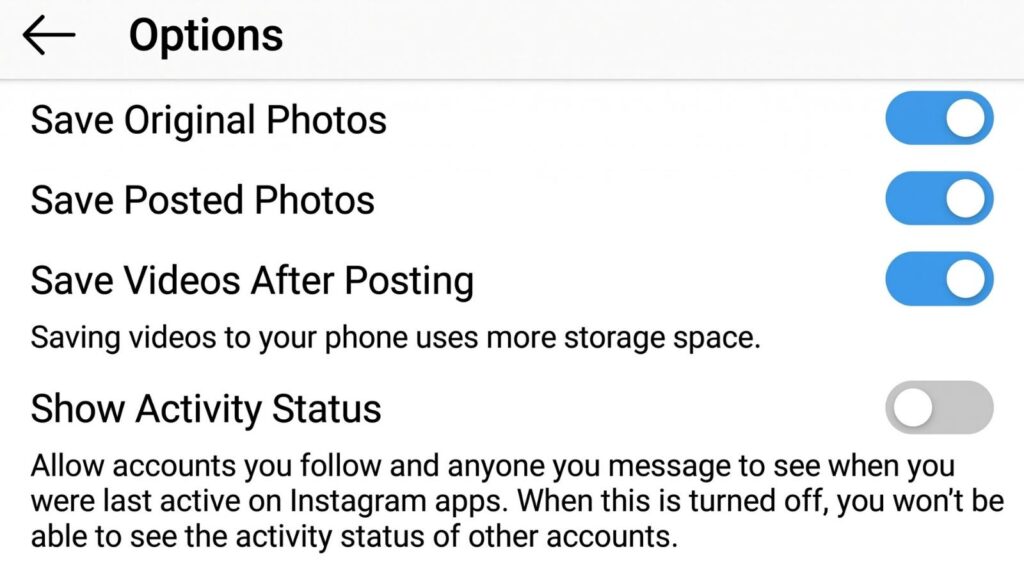
How to Turn Off Activity Status
Under a minute, and the path is identical on iOS and Android because the toggle lives inside the in-app settings panel that ships in the same place on both.
On mobile (iPhone and Android)
- Open Instagram and tap your profile icon in the bottom right corner
- Tap the hamburger menu (three horizontal lines) in the top right
- Tap Settings and Activity
- Scroll to Messages and story replies, under “How others can interact with you”
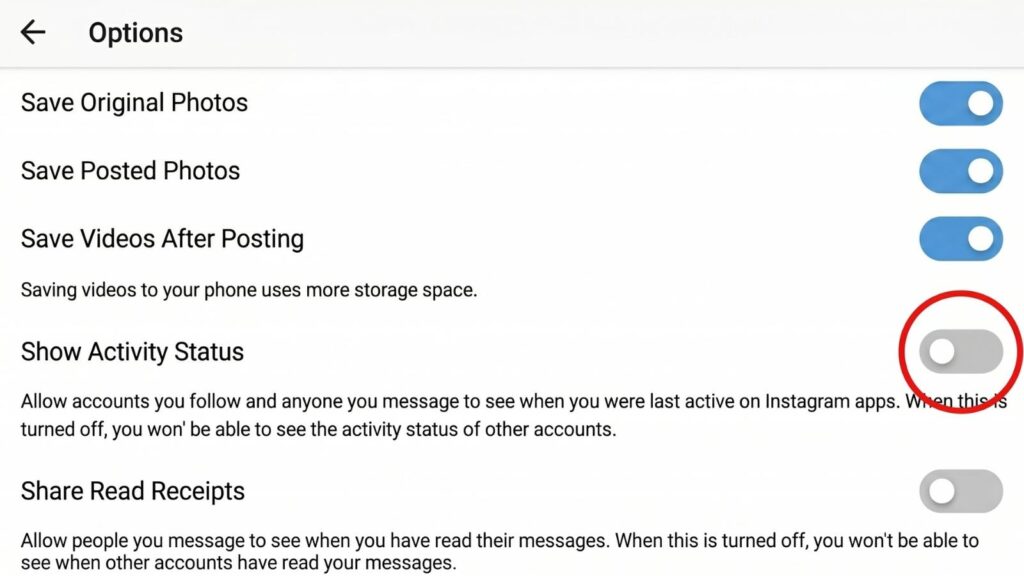
- Tap Show Activity Status
- Toggle it off
The change saves automatically. No confirm button. Instagram will warn you that you’ll also stop seeing other people’s status, which is expected.
On desktop
- Open Instagram in your browser and sign in
- Click More in the bottom left corner
- Click Settings
- Choose Messages and story replies
- Click Show activity status and switch the toggle off
Changes sync across devices instantly. There’s no separate per-device setting, so switching it off on your phone kills it on your tablet and desktop too. The only difference between platforms is where the menu sits.
If the toggle isn’t where you expect, update the app. Instagram moves this setting around with updates, and an outdated version can hide it or reset your preference. Also worth knowing: activity status is a per-account setting, so if you run multiple accounts, you disable it separately on each.
If You Hide Your Status, Whose Can You Still See?
Here’s the catch nobody mentions until after they’ve flipped the switch.
None. Activity status is reciprocal by design. The moment you turn yours off, you lose the ability to see everyone else’s. No more green dots in your DM list, no more “Active 5m ago” timestamps under anyone’s name.
Instagram makes this trade deliberately to keep the feature symmetric. You cannot hide your own status while still monitoring when others are online. It’s all or nothing, in both directions.
The trade-off, plainly:
| You keep it ON | You turn it OFF |
|---|---|
| Others see when you’re active | Others see nothing |
| You see when others are active | You see nothing either |
| Pressure to reply in real time | Freedom to browse quietly |
For most people who turn it off, losing sight of other people’s status is a price worth paying. You rarely needed to know when your DM contacts were online anyway, and the relief from the “you there?” pressure is immediate.
Can You See Someone’s Activity If They’ve Hidden It?
Short answer: no, and be skeptical of anything claiming otherwise.
If someone has turned off their activity status, their green dot and last active timestamp are gone for everyone. No app, tool, or trick recovers that data, because Instagram simply stops broadcasting it. Any service promising to show you a hidden user’s “last active” time is guessing, fabricating, or fishing for your password.
But here’s what people actually want when they ask this. They’re not really after a timestamp. They want to know what someone is doing on Instagram, and activity status is a crude proxy for that. There’s a better signal, and it’s public.
Follow activity tells you far more than a green dot. When someone follows a batch of new accounts, that’s real behavior you can see, timestamped by recency, no matter what their activity status setting says. A green dot tells you they opened the app. Their recent follows tell you what they’ve been paying attention to.
Recently-Followed reads exactly this. Enter any public username and see who they recently followed, in chronological order, whether or not their activity status is hidden. It reads public data only, needs no login, and leaves no trace on their account. Where activity status shows a dot, follow tracking shows intent.
For the fuller method, our guide on how to find out who someone recently followed walks through it step by step.
What Turning It Off Doesn’t Hide
Disabling activity status is a real privacy win, but it doesn’t make you invisible. People often overlook everything it doesn’t cover.
After turning it off, others can still see:
- Your username on story viewer lists when you view their story
- Your likes and comments on public posts
- That you’ve read a DM, if read receipts are on (a separate toggle)
- Your typing indicator inside an active chat (another separate setting)
- Your follower and following counts
For full messaging privacy, you need more than the activity toggle. Read receipts and typing indicators live in the same Messages and story replies menu, and you switch them off separately. And for story views, no in-app setting helps, which is why an anonymous story viewer exists for the one exposure Instagram won’t let you hide natively.
Why Instagram Shows Your Active Status at All
Ever wondered why this feature exists in the first place? Instagram didn’t add active status by accident.
The whole point is to push real-time conversation. When you can see that someone was recently active, you’re more likely to message them and expect a quick reply. Instagram wants that back-and-forth, because DM activity keeps users in the app longer. Your online status is engagement bait, and it works.
With over 3 billion users logging into Instagram monthly, that green dot creates a constant, low-level pull. You see a friend is active, you message them. They see your status, they reply. The app hums with real-time chat, and everyone stays glued a little longer.
That’s fine when you want it. The problem is that Instagram turns it on by default and gives other Instagram users a window into your online activity you never asked to open.
A few things people misread about the feature:
- It’s not a profile stat. Active status never appears on your entire profile or in the feed. Only in messaging.
- It’s not “always watching.” The green dot reflects the app being open and connected, not you actively scrolling.
- It’s not tied to Close Friends. Your Close Friends list controls who sees certain stories, a completely separate feature. Active status has its own audience rules.
- It’s reciprocal. The moment you hide your activity status, you lose sight of everyone else’s too.
Understanding why it’s on helps you decide whether you actually want it. For a lot of people, once they realize the feature exists mainly to serve Instagram’s engagement goals rather than their own, the choice to switch it off gets easy.
If the green dot’s real-time pressure is the issue, turning off active status solves it at the root. You keep full messaging; you just remove the “reply right now” expectation that the status quietly creates.
Building a More Private Instagram Setup
Active status is one toggle. Real privacy comes from stacking a few of them together, and most people stop after just one.
If you want more control over what Instagram shares, here’s the sequence worth running once. Open Instagram, tap your profile icon in the top right corner or bottom right depending on your version, then use the three-line menu to open settings.
The privacy stack, in order of impact:
- Hide your activity status. Select Settings, then Messages and story replies, and toggle off Show Activity Status. Kills the green dot and last active time.
- Turn off read receipts. Same menu. Stops the “Seen” label appearing when you open a DM.
- Disable the typing indicator. Also in that section. Others can’t see the three dots when you’re mid-reply.
- Turn off contact syncing. Click Privacy, then find contact upload. This is the setting that quietly feeds your phone book into Instagram’s suggestions.
- Review search engine indexing. If you don’t want your public posts surfacing on Google, adjust searchability here.
Each toggle closes one small leak. Together they give you a meaningfully more private setup than the defaults ever will.
| Setting | What it hides | Where |
|---|---|---|
| Activity status | Green dot, last active | Messages and story replies |
| Read receipts | “Seen” label | Messages and story replies |
| Typing indicator | The three dots | Messages and story replies |
| Contact syncing | Your phone book link | Privacy |
The web version works too. On a mobile browser or desktop, open settings from the menu and most of these same controls live there, syncing across devices instantly.
One honest limit: none of these hide story views. When you watch someone’s story in the app, your username lands on their list no matter how many other privacy toggles you’ve flipped. That single exposure needs a different approach, which is where an anonymous viewer comes in rather than any in-app setting.
If a setting won’t save, force close the app fully and reopen it. Instagram occasionally resets preferences after updates, so it’s worth checking your toggles stayed off after any app update, alongside whatever other features you rely on.
Sorting Out the Activity Status Confusion
Does turning off activity status affect my DMs?
No. Your messages send and receive exactly as before. Activity status only controls the green dot and last active timestamp. You can still DM anyone, receive messages, and use every chat feature normally. The only change is that people can’t see when you’re online, and you can’t see when they are.
Can they see that I read their message?
That’s a separate setting called read receipts, not activity status. Turning off activity status does not hide the “Seen” label on your DMs. To stop people seeing that you opened their message, you disable read receipts separately, in the same Messages and story replies menu. As of the 2026 app, both are tied to that section.
Does airplane mode let me read messages secretly?
It used to be a common trick: opening a DM in airplane mode so no “Seen” registered. It’s unreliable now. The read receipt syncs the moment your device reconnects to the internet. Turning off read receipts properly is the only dependable way to read without the “Seen” showing.
Will people know I turned off my activity status?
Not directly. Instagram sends no notification when you disable it. Someone might infer it if your green dot vanishes and never returns, but there’s no alert and no way to confirm. Plenty of people simply won’t notice.
Does hiding activity status make my account anonymous?
No. It only hides the green dot and last active time. Your story views, likes, comments, follower counts, and read receipts (unless separately disabled) all stay visible. It’s one layer of privacy, not a cloak.
Can I turn it off for just one person?
No. Activity status is all-or-nothing. You can’t hide it from a single contact while showing it to others. When it’s off, it’s off for everyone you follow or message, and you lose sight of all of their statuses too.
Take Control of What Instagram Shows with Recently-Followed
Your activity status is a small setting with an outsized effect on your peace of mind. It broadcasts your green dot to everyone in your DMs, pressures you into replying before you’re ready, and hides in a menu most people never open. Switching it off takes under a minute, and the only cost is losing sight of other people’s dots, a trade most never regret.
Key takeaways:
- Activity status shows a green dot when you’re online and a timestamp when you’re not
- Only accounts you follow or have DMed can see it, and only in messaging
- Turn it off under Settings → Messages and story replies → Show Activity Status
- The setting is reciprocal, so hiding yours hides everyone else’s from you
- It doesn’t hide story views, likes, comments, or read receipts
- No tool can show a hidden user’s last active time, and any that claims to is a scam
When you want to know what someone’s actually doing on Instagram, a green dot was never the answer. Recently-Followed shows you who any public account recently followed in real chronological order, regardless of their activity status, and every check catches what’s new. Free, anonymous, no login, no traces. See who someone recently followed now.

.webp)